

VEHICLE CONTROL

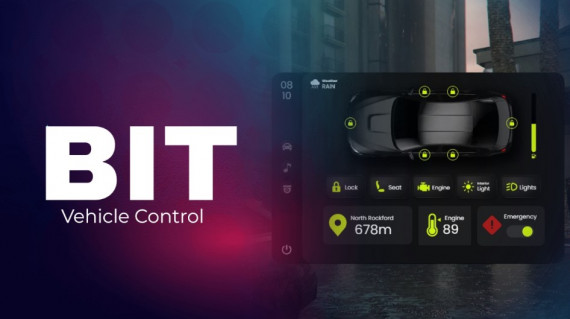
Vehicle Control - Compatible with ESX, QB and QBOX
🚗 Complete Vehicle Control System for Your FiveM Server
Take vehicle management to the next level with this all-in-one vehicle control system. With everything accessible through a single menu, players will enjoy a seamless and immersive driving experience.
✨ Key Features:
- 💺 Seat Management: Easily switch seats within the vehicle.
- 🚪 Door Control: Open or close vehicle doors with a single click.
- 🔧 Engine and Light Controls:
- Turn the engine on/off.
- Toggle the interior lights.
- Activate/deactivate low beam headlights.
- 🌡️ Engine Monitoring: View the engine temperature directly from the menu.
- 🗺️ Navigation Assistance: If a route is marked on the map, it will display the street name and remaining distance.
- 🚨 Emergency Button: Activate or deactivate the emergency mode as needed.
- ⛽ Fuel Level: Check the current fuel level of the vehicle.
- ⏱️ Server Info: View the current time and weather conditions in the server.
📻 Vehicle Radio System:
Enjoy an integrated radio system within the menu:
- Enter a YouTube URL to play your favorite music.
- Display the track cover while listening.
- The music continues playing even after leaving the menu or the vehicle.
🎥 Rear Camera:
A built-in rear camera helps players park their vehicles easily without damaging them. Perfect for tight spaces and enhancing realism.
⚙️ Dependencies:
- bitsound (required)
- cd_easytime (optional)
🔥 Elevate your server's vehicle interaction with this fully customizable and feature-packed vehicle control system. Perfect for providing players with a realistic and engaging driving experience!
Installation
Remember that you will find the installation documentation in the documentation: https://docs.bit-scripts.com
Support
If you have any questions about the installation of a script or how it works, you can contact us through Discord by opening a ticket. Or you can send an email to the support address that appears after the purchase.